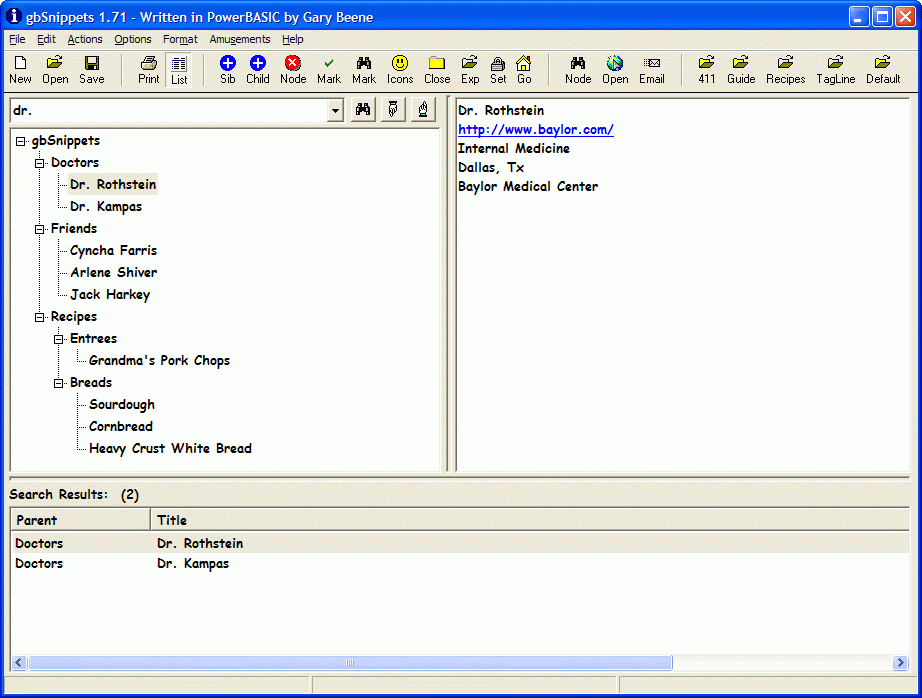
gbSnippets is an easy-to-use freeware source code librarian for PowerBASIC
programmers. It comes with a library of almost 1000 code examples for the PowerBASIC
language and provides search features that enable you to quickly locate the code you need.
To install v2.1, just unzip the download file into a folder of its own. The v1.x and v2.x
library files are compatible, but major changes made in v2.1 make it necessary to place the
two versions in separate folders. You may install both versions on your PC.
Application Features
gbSnippets provides a variety of features which make it useful for managing libraries
of source code or any text information.
Tree-style Organization
Powerful search (AND, OR)
Export to HTML
Bookmarking
Code analysis tools
Script commands
Code insertion
Online updates
Send code to PowerBASIC IDE
Compile/run snippets directly
 
Advanced Code Editor
The code editor provides state-of-the-art editing features which maximize your productivity,
including Intellisense-like features. I use gbSnippets to edit all of the code that I write!
Unlimited undo/redo
Line Numbers
Syntax highlighting
Intellisense-like features
Code folding
Indentation guidelines
AutoIndentation
Active URLs
Greenbar effect
Brace Highlighting
Comments and suggestions are welcome!
New in v2.1!
A key goal in releasing version 2 was to provide a better editor - more modern, time-saving,
useful features and a more stable editing experience. Here are some of the improvements added
in the v2.0/2.1 releases.
Advanced Editor Features line numbers, code folding, Intellisense-like editing (call tips
and autocompletion), brace highlighting, autoindentaiton and indentation guides - including special
handling of TAB/backspace at left side of lines
Compile/Run Snippets execute snippets by directly calling the PowerBASIC compiler
Greenbar Effect adding alternating background line colors as visual guide for the eyes (my personal favorite!)
Code Formatting format entire snippets with standard indentation
Unlimited Undo/Redo limited only by available memory
Direct Compiling now you can compile and execute your snippets without first opening
up the PowerBASIC editor (the option to open code in the PowerBASIC IDE is still supported)
Code Insertion Library a library of source code blocks which can be easily inserted into any snippet
Navigation as with Internet browsers, you can now move from snippet to snippet in the order which you've visited them
Toolbar Enhancements larger, more descriptive toolbar icons and text eliminated from toolbar
User Tools feeding snippets to external applications for code assessment, starting with PBCodec
Quick Open easy access to available snippet libraries from dropdown menu on toolbar
Features Eliminated
Simplification of the user interface was also a key goal for v2.0. To that end,
I eliminated a wide range of lesser features, toolbar icons, and menu items that I found were simply
rarely used, or were not implemented well enough to draw user interest. The following list identifies
those features I've removed. I'll be happy to entertain requests to restore features, although
some features, such as server synchronization, will be implemented as stand alone applications,
but accessible from within gbSnippets.
All of the graphic "amusements"
Server synchronization
Snippet side-by-side comparisons
Email list option
IDE+ (insertion of selection into template, and then into PB IDE environment
Bookmarks on the toolbar (bookmarks still supported from menus)
Multiple programming language support (only PowerBASIC is now supported)
Custom fonts/sizes/colors
Import snippets directly from files
Password protection of snippet files
Hiding of programmer features
Alarms/Timers
Snippet time stamping
Backup/restore
Proportional splitterbar position
Alternate layouts
Option to "hide" programmer features
Display of Tree icons
Option to hide "root" of tree
Calculator/Character display menu options
Removal of QuickOpen toolbar icons (replaced with dropdown list next to "Open" button)
Daily message from author
Comment spell checking
Revision History
Here are some of the more recent changes. As you can see, since the initial release there's
been a small flurry of updates where I've either added something a user has requested (brace
highlighting, font selection), changed how a feature worked (print and export) or simply fixed
a few things that weren't working the way they should.
Be sure to update to the latest version to get the latest features and fixes!
9/17 - v2.13
fixed: Win7 Aero mode display problem with GoTo dialog
added: POFFS menu (runs poffs\poffs2.exe file, if found in subfolder)
9/16 - v2.12 - fixed: Removed HotKey Ctrl-S (inteferes with other apps)
9/09 - v2.11 - fixed: changes to case style were not persistent between sessions
9/07 - v2.10
added: folder import (aimed specifically towards importing PowerBASIC sample folder!)
added: go to line (Ctrl-G)
added: improved Tree summary
added: Action menu to display Compiler/Include paths
fixed: compile/run correctly handles DLL creation
fixed: selection following Code Formatting corrected
fixed: file drop now accepted by Tree
fixed: About dialog test flashing eliminated
fixed: margin now restored following setting Font
9/02 - v2.08 - added: basic autoindentation
9/01 - v2.07 - fixed: compiler server filepath selection not saved on exit
9/01 - v2.06 - added: font selection, print/export improvements
8/31 - v2.05 - fixed: menu Exit didn't ask to save changes
8/31 - v2.05 - added: script command "..font" to select custom font
8/30 - v2.04 - fixed: editor didn't get focus on ESC from Find dialog